


What Do I Do If My Renewal Payment Fails?
Last updated: Aug 24, 2026
213
views

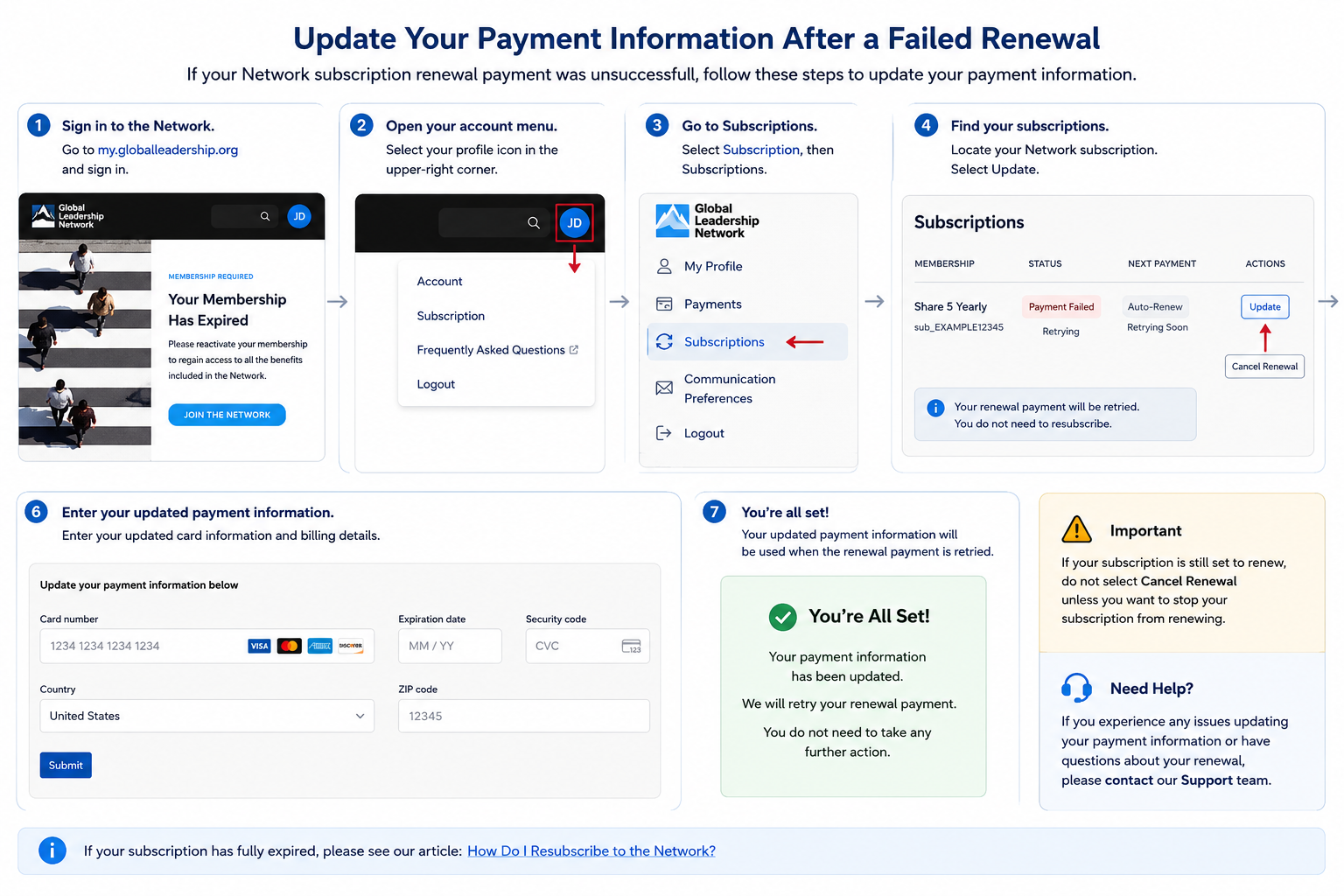
If your Network subscription renewal payment was recently unsuccessful, you can update your payment information through your Network profile prior to it retrying.
You do not need to purchase a new subscription or resubscribe if your renewal is scheduled to be retried.
Update Your Payment Information
- Sign in to the Network at https://my.globalleadership.org.
- Select your profile icon in the upper-right corner.
- Select Subscription.
- From your profile, select Subscriptions.
- Locate your Network subscription and select Update.
- Enter your updated:
- Card number
- Expiration date
- Security code
- Country
- Billing ZIP code
- Select Submit.
Your updated payment information will be used when the renewal payment is retried.
Important
If your subscription is still set to renew, do not select Cancel Renewal unless you want to stop your subscription from renewing.
If your subscription has fully expired, please follow the steps within How Do I Resubscribe to the Network?
Need Help?
If you experience any issues updating your payment information or have questions about your renewal, please contact our Support team.

