


How Do I Resubscribe to the Network?
Last updated: Aug 19, 2026
289
views

If your Network subscription has expired, you can resubscribe through your Network profile.
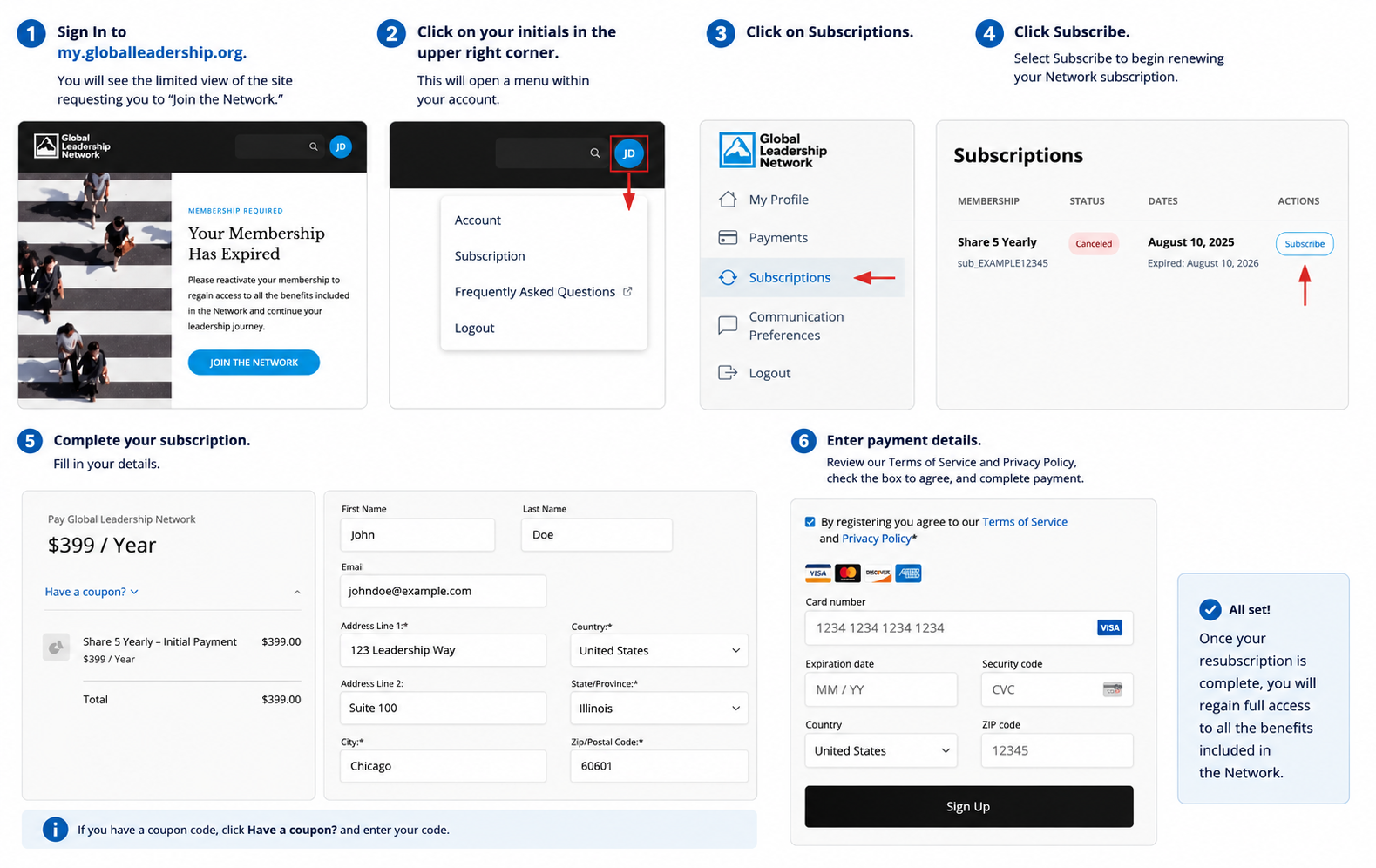
Sign In to the Network
- Go to https://my.globalleadership.org and sign in.
- You may see a limited view of the Network with a message that your subscription has expired.
- Select your profile icon in the upper-right corner.
- From the menu, select Subscription.
Access Your Subscription
- From your profile, select Subscriptions.
- Locate your expired Network subscription.
- Under Actions, select Subscribe.
You will be taken to the page where you can renew your Network subscription.
Complete Your Subscription
- Review the subscription price and details.
- Enter or confirm your name and billing information.
- If you have a coupon code, select Have a coupon?, enter your code and apply it.
- Review the Terms of Service and Privacy Policy, then select the checkbox to indicate your agreement.
- Enter your payment information.
- Select Sign Up to complete your subscription.
Once your subscription is complete, you will regain full access to the benefits included in the Network.
Need Help?
If you experience any issues resubscribing to the Network, please contact our Support team.

